Home Company Products Catalog Blog Contact 0216 364 02 10
NOVUS N1500FT Flow Totalizer Indicator - debi-gostergesi.jpg

NOVUS N1500FT Flow Totalizer Indicator

What Is the NOVUS N1500FT Flow and Totalizer Indicator?

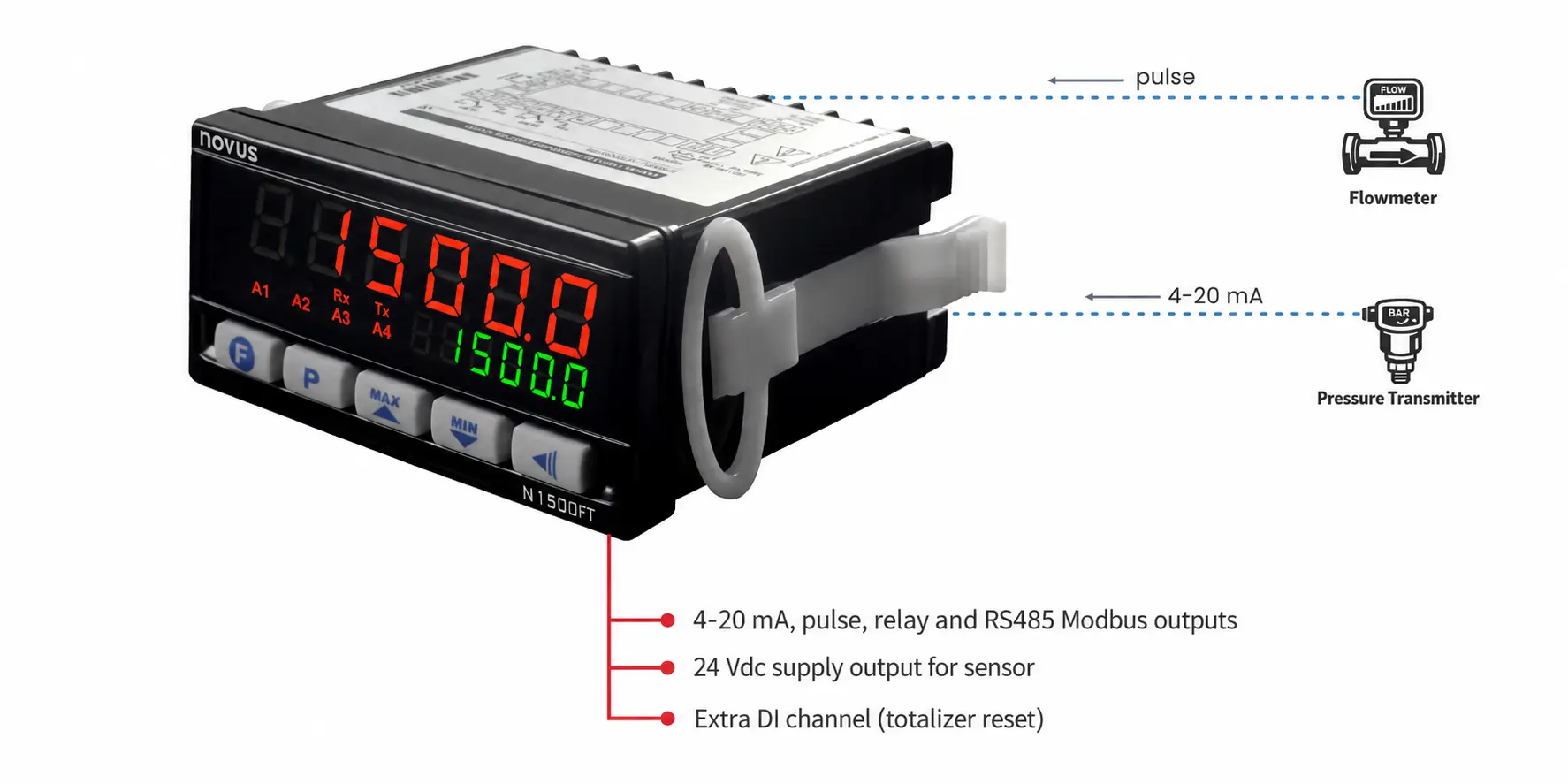
The NOVUS N1500FT is a process indicator that uses 4-20 mA and pulse signals to display instantaneous flow rate, total consumption, and counter values. With its totalizer, alarm outputs, and Modbus communication features, it is suitable for water, flow measurement, and production counting applications.

Product Images
Dimensions

48 x 96 mm (horizontal)

Depth: 92 mm

   
Input 1

Pulse

  • Dry Contact: 0.1-10 Hz
  • Pulse (NPN or PNP): 0.1-50 kHz
Input 2 4-20 mA
Input 3

DI (Digital Input)

(Can be used to reset the totalizer)

   
Output 1 Pulse (0-100 Hz)
Output 2 4-20 mA Analog Output
Outputs 3, 4

Relay (2 Outputs)

ON/OFF outputs for alarm or control purposes

Output 5 RS-485 Modbus
   
Power Supply Output

24 VDC

Sensor Power Supply Output


Display 2-Line 7-Segment Display
Display Options
  • Option 1: Upper Display Instantaneous Flow Rate, Lower Display Total Flow
  • Option 2: Upper Display Total Flow, Lower Display Instantaneous Flow Rate
  • Option 3: Upper Display Instantaneous Flow Rate, Lower Display Non-Resettable Total Flow
  • Option 4: Upper Display Instantaneous Flow Rate (from Pulse Input), Lower Display 4-20 mA Second Parameter Display
   
Functions
  • Totalizing function from the 4-20 mA instantaneous flow signal
  • Totalizer reset via RS-485 Modbus
  • Totalizer reset via the third-channel DI input
  • Password-protected menu access
  • 4-20 mA instantaneous flow output from pulse flow input (Pulse-to-4-20 mA converter function)
  • If the flow meter is connected only to the pulse input channel, a different sensor, such as a pressure or temperature sensor, can be connected to the second 4-20 mA input. The device can then be used as an indicator for two different parameters, and all data can also be read via RS-485 Modbus.
Power Supply 100-240 VAC
Demo software downloads will be activated by filling out the form.
Now you can download the following software suitable for you. After clicking the button, the download link of the software will be sent to your e-mail address.
WhatsApp
×
Demo of this product is available.

You can download the free demo to try this product. To access the download form click.